 vikram1@gmail.com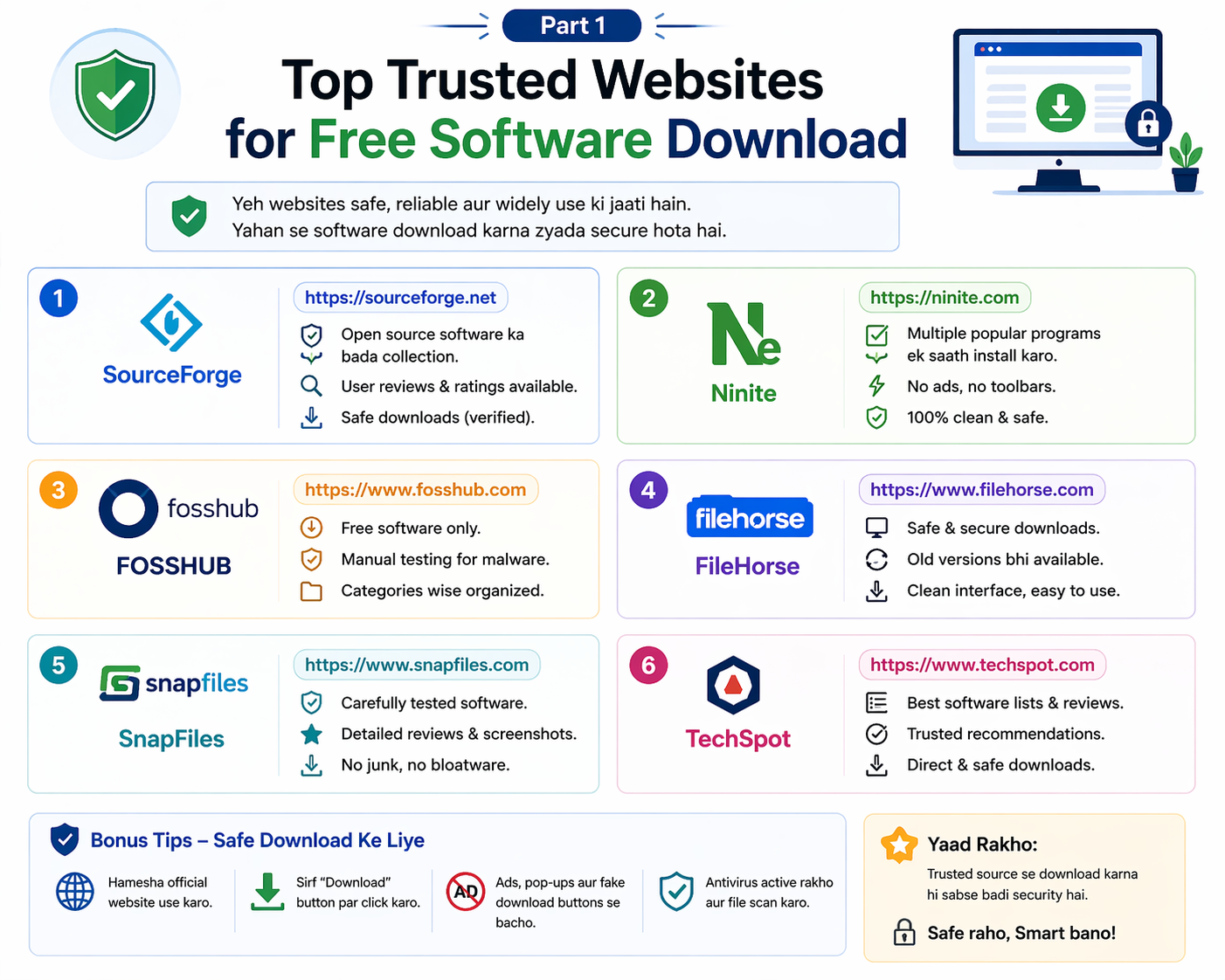
Kya Aap Jaante Hain Ki Galat Website Se Software Download Karna Kitna Khatarnak Hai?
Imagine karo — aap internet par search karte ho “best video editor free download.” Pehla result aata hai, aap click karte ho, ek bada sa “Download Now” button dikhta hai, aap click karte ho — aur download ho jaata hai.
Lekin jo download hua woh actually video editor nahi tha. Woh ek malware tha jo aapke computer mein chhup gaya. Aapka bank account detail, social media passwords, aur personal photos — sab kuch ek hacker ke paas chale gaye.
Yeh koi horror story nahi hai. Yeh India mein har roz lakho logon ke saath hota hai.
Isliye aaj ki is Free Software Download Guide mein hum aapko sikhayenge ki software kahan se download karna chahiye, kahan se nahi karna chahiye, aur kaise aap guarantee kar sakte hain ki jo bhi download kiya woh 100% safe aur virus-free hai.
Yeh guide specially un logon ke liye hai jo internet par software dhundhte hain lekin nahi jaante ki safe sites konsi hain aur dangerous sites konsi. Agar aap yeh guide puri padhenge, toh guarantee hai ki aap kabhi bhi galat jagah se software download nahi karenge.
Sabse Pehle Samjho — Virus Wala Software Kaise Pehchanen?
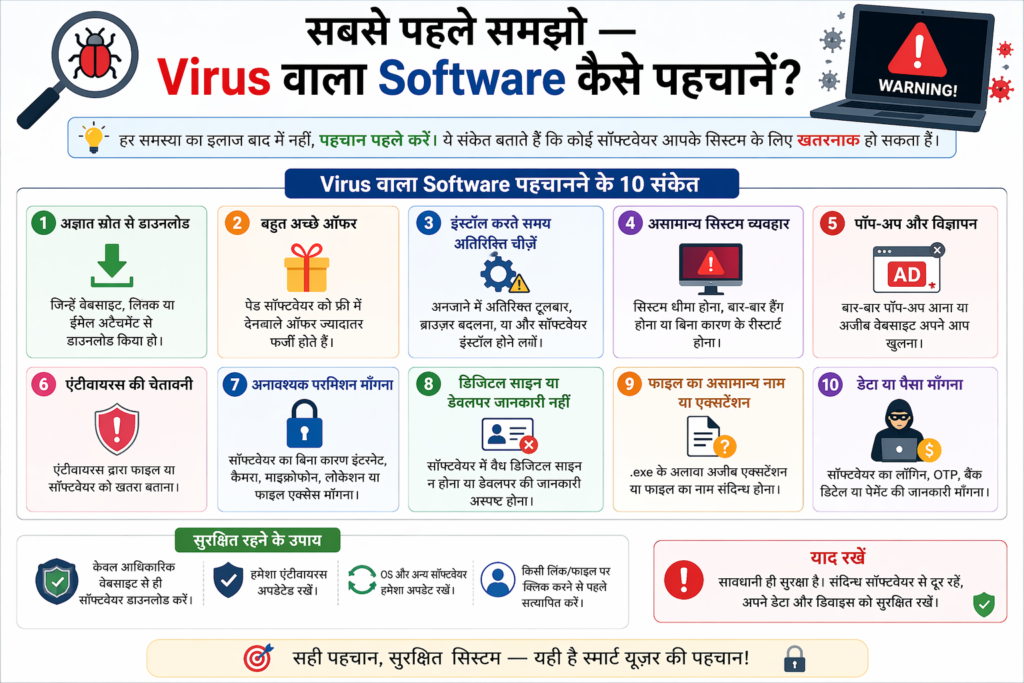
Free Software Download Guide ki shuruat hoti hai sabse zaroori knowledge se — kaise pata chalega ki koi site safe hai ya nahi.
Red Flag No. 1 — Bahut Saare “Download” Buttons
Agar kisi website par ek page par 3-4 “Download Now” ya “Free Download” buttons dikhein, toh woh saare real nahi hain. Zyada tar fake buttons hote hain jo aapko kisi aur site par le jaate hain ya malware download karwa dete hain.
Rule: Hamesha sirf ek — official aur clearly labeled — download button use karein.
Red Flag No. 2 — URL Mein Galat Spelling
Fake websites official sites ki copy hoti hain — lekin URL mein choti si galti hoti hai. Jaise “libreoffice.org” ki jagah “libre0ffice.com” ya “libre-office.net.” Yeh websites bilkul original jaisi dikhti hain lekin hain nahi.
Rule: Download karne se pehle browser ke address bar mein URL ek baar dhyan se padhein.
Red Flag No. 3 — “No Antivirus” Ya “Disable Your Antivirus” Instructions
Agar koi website ya README file yeh likhi ho ki “pehle apna antivirus band karo” — toh seedha woh tab close karo. Koi bhi legitimate software kabhi yeh nahi kehta.
Red Flag No. 4 — File Size Ka Match Na Karna
Agar VLC Media Player ka official size 40MB hai aur aapko kisi site se 3MB mein mil raha hai — toh yeh genuine nahi hai. Yeh ek common trick hai jisme asli software ki jagah malware hota hai.
Red Flag No. 5 — HTTPS Nahi Hai
Safe websites ke URL mein “https://” hota hai aur browser mein lock icon dikhta hai. Agar “http://” hai (bina ‘s’ ke) toh woh site secure nahi hai.
Part 1 — Top Trusted Websites for Free Software Download
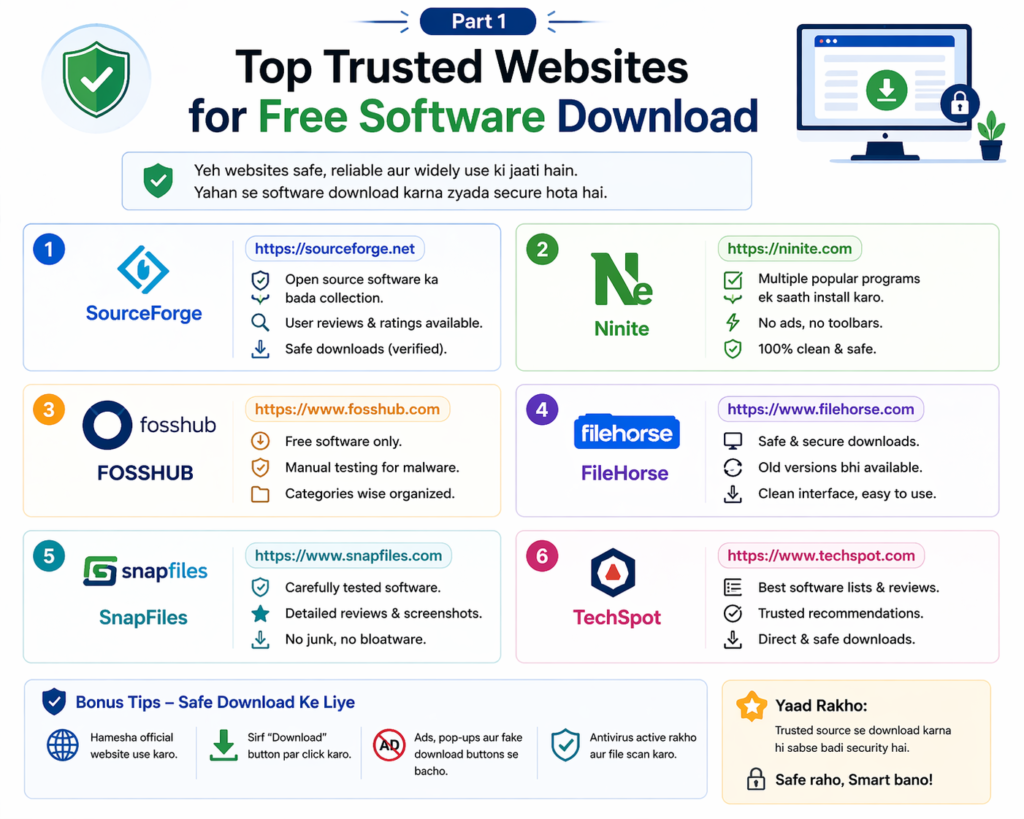
Yeh Free Software Download Guide ka sabse important hissa hai. Yeh websites 100% safe, verified, aur trusted hain.
1. Official Developer Websites — Hamesha Pehli Choice
Sabse safe download hamesha software ke original developer ki website se hoti hai. Isme koi middleman nahi hota, koi modification nahi hoti, aur latest version milta hai.
Examples:
- VLC → videolan.org
- LibreOffice → libreoffice.org
- GIMP → gimp.org
- Audacity → audacityteam.org
- 7-Zip → 7-zip.org
- Brave Browser → brave.com
Kaise dhundhen official website: Google par “[software name] official site” search karein. Ya phir Wikipedia par software ka page dekho — wahan official website ka link hota hai.
Yeh sabse reliable source isliye hai kyunki developer khud apna software yahan upload karta hai. Koi intermediate nahi hai jo file mein kuch add kar sake.
2. SourceForge — Open Source Ka Trusted Hub
URL: sourceforge.net
SourceForge duniya ka sabse purana aur trusted open source software repository hai. 1999 se chal raha hai aur 430,000+ projects host karta hai.
Kyu safe hai:
- Har project community dwara reviewed hota hai
- Download stats publicly visible hote hain
- Version history available hoti hai
- Malware scan automatically hota hai
Popular software yahan se:
- FileZilla
- ClamAV antivirus
- WinSCP
- Audacity (alternate source)
Is Free Software Download Guide mein SourceForge ko isliye include kiya kyunki yeh official developer site ke baad sabse reliable backup source hai.
3. GitHub Releases — Developers Ka Khazana
URL: github.com
GitHub duniya ka sabse bada code repository platform hai. Agar koi software open source hai toh uski latest release files GitHub par milti hain.
Kaise use karein:
- GitHub par software ka naam search karein
- Repository open karein
- Right side mein “Releases” section dekho
- Latest release mein .exe ya .dmg file download karein
Kyu 100% safe hai:
- Code publicly visible hai — koi kuch chhupa nahi sakta
- Download count aur community ratings dikhte hain
- Verified developers ki badges hoti hain
- Microsoft owned platform hai
Limitation: Thoda technical lag sakta hai beginners ke liye — lekin practice se aasaan ho jaata hai.
4. Microsoft Store — Windows Users Ke Liye Safe Option
URL: apps.microsoft.com ya Windows mein built-in store
Agar aap Windows use karte hain, toh Microsoft Store ek excellent safe option hai. Yahan saare apps Microsoft dwara reviewed hote hain.
Free software available hai:
- VLC Media Player
- Audacity
- Kdenlive
- Various PDF readers
- Development tools
Biggest advantage: Automatic updates milte hain, manual download ki zaroorat nahi, aur virus ka koi risk nahi.
5. Ninite — Multiple Software Ek Saath Safely Install Karo
URL: ninite.com
Ninite ek unique platform hai jo Free Software Download Guide mein must-mention hai. Yeh aapko ek saath multiple trusted free software select karne deta hai aur ek hi installer bana deta hai — bina kisi bundled crapware ke.
Kaise kaam karta hai:
- ninite.com par jaao
- Jo software chahiye woh select karo (VLC, 7-Zip, LibreOffice, etc.)
- “Get Your Ninite” button click karo
- Ek installer download hoga jo sab kuch install kar dega
Kyu amazing hai:
- No ads, no toolbars, no extra software
- Automatically latest version install hota hai
- Completely free service
- Trusted by IT professionals worldwide
Nayi computer setup karne waalon ke liye yeh ek lifesaving tool hai.
6. FileHippo — Legacy Software Ka Reliable Source
URL: filehippo.com
FileHippo ek purana aur established software download site hai. Yahan popular software ke purane versions bhi milte hain — jo kabhi kabhi zaroorat padti hai compatibility ke liye.
Safe use ke tips:
- Green download button use karein, baaki ke ads se bachein
- Always verify file size matches official size
- User reviews padhein
7. MajorGeeks — Tech-Savvy Users Ka Trusted Source
URL: majorgeeks.com
MajorGeeks ek specialized site hai jo mainly utility tools, system optimization software, aur security tools provide karta hai. 2001 se chal raha hai aur tech community mein highly respected hai.
Best for:
- System diagnostic tools
- Network utilities
- Security scanners
- Portable apps
8. PortableApps — Bina Install Kiye Use Karo
URL: portableapps.com
Yeh Free Software Download Guide mein ek unique recommendation hai. PortableApps platform par aisa software milta hai jo USB drive par install ho sakta hai aur kisi bhi computer par bina installation ke chal sakta hai.
Kyu useful hai:
- School ya office computer par install rights nahi hain? — Koi baat nahi
- USB mein rakho aur kahaan bhi use karo
- Computer par koi traces nahi chhodta
- Completely free aur safe
Available apps: Firefox, LibreOffice, VLC, GIMP — sab portable versions mein
Part 2 — Download Karne Ka Sahi Process — Step by Step
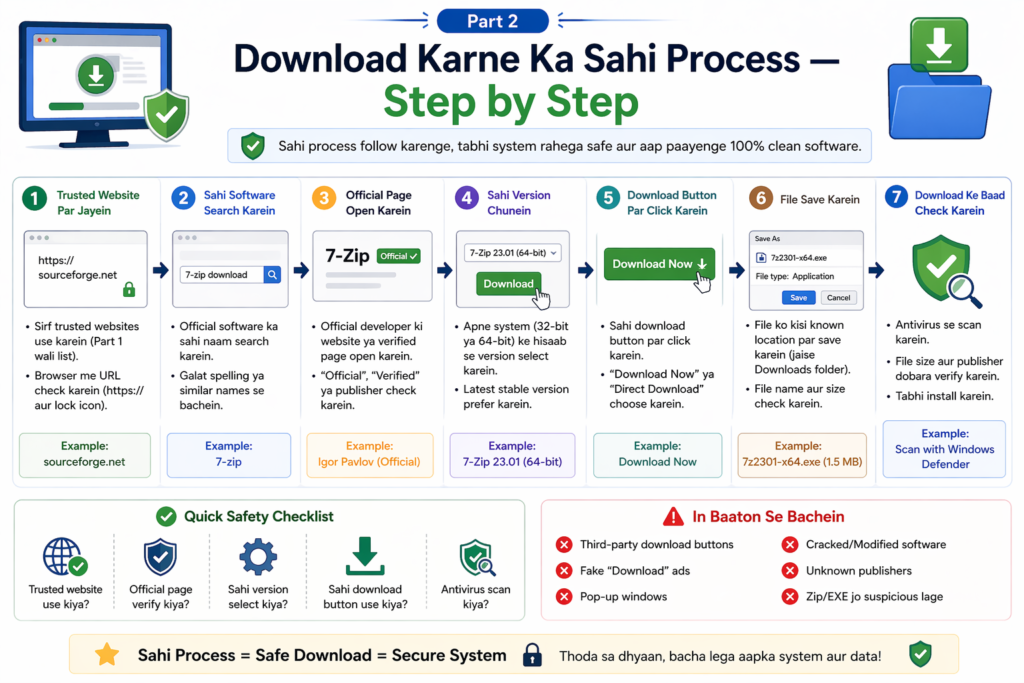
Ek safe download sirf sahi website dhundhne se nahi hoti — process bhi sahi honi chahiye. Yeh Free Software Download Guide ka practical section hai.
Step 1 — Software Ka Official Naam Confirm Karo
Pehle clearly jaano ki aap exactly kya download karna chahte hain. Agar aapko video editor chahiye toh “VLC” ya “DaVinci Resolve” — naam specific hona chahiye.
Step 2 — Official Website Ya Trusted Source Find Karo
Google par “[software name] download” search karo. Pehle organic results dekhein — ads wale results pe directly click mat karo. Official website usually pehle 2-3 results mein hoti hai.
Step 3 — URL Carefully Check Karo
Site par aane ke baad address bar mein URL verify karo. Spelling check karo. HTTPS confirm karo. Lock icon dekho.
Step 4 — File Download Karo
Correct download button click karo. Ek baar mein sirf ek file download honi chahiye. Agar multiple downloads start hon, toh kuch galat hai.
Step 5 — VirusTotal Se Scan Karo
Yeh step bahut zaroori hai. File download hone ke baad:
- virustotal.com par jaao
- “Choose file” click karo
- Downloaded file select karo
- Scan complete hone do
Agar 70+ engines mein se koi bhi red flag nahi dikhata — file safe hai. Agar 2-3 se zyada engines kuch detect karein — file delete karo.
Step 6 — File Size Verify Karo
Official website par software ka size usually mentioned hota hai. Download ki hui file ka size match karo. Major difference hai toh suspicious hai.
Step 7 — Install Karo — Custom Option Choose Karo
Installer run karte waqt “Custom Install” ya “Advanced Install” choose karo. Default install mein kabhi kabhi extra software aata hai. Custom mein aap uncheck kar sakte hain.
Step 8 — First Run Ke Baad Antivirus Scan Karo
Install hone ke baad Windows Defender ya apna antivirus chalao aur full system scan karo — just to be sure.
Part 3 — Virus Se Bachne Ke 10 Golden Rules
Is Free Software Download Guide mein yeh rules sab se important hain — inhe yaad karo aur hamesha follow karo.
Rule 1: Sirf official websites ya is guide mein mention kiye trusted platforms se download karo.
Rule 2: Hamesha VirusTotal scan karo download ke baad.
Rule 3: “Antivirus disable karo” bolne wali site se kabhi download mat karo.
Rule 4: Multiple download buttons dikhein toh woh page close karo.
Rule 5: Free software ke liye kabhi credit card details mat do.
Rule 6: Custom install choose karo — default install mein extra garbage aa sakta hai.
Rule 7: Pop-ups aur ads par kabhi “Download” button mat click karo — yeh real download buttons nahi hote.
Rule 8: Software update notifications hamesha official app se lein — random websites se nahi.
Rule 9: Agar file .exe ke alawa kisi aur extension mein hai (.bat, .vbs, .cmd) aur aapne software download kiya tha — toh suspicious hai.
Rule 10: Apna Windows Defender ya antivirus hamesha on rakhein — kabhi band mat karo.
Part 4 — Kaunsi Sites Se Bilkul Bachna Chahiye
Free Software Download Guide ka yeh section equally important hai. Kuch sites hain jinhe hamesha avoid karna chahiye:
Softonic — Iske installers mein frequently extra software bundled hota hai. Jab bhi possible ho official site prefer karein.
CNET Download (download.cnet.com) — Purani history mein bundled adware ke cases aaye hain. Isko avoid karein.
Random torrent sites — Kisi bhi software ke liye torrent use karna illegal aur dangerous dono hai.
“Full version free download” wali sites — Yeh sites paid software ke cracks offer karti hain — yeh 99% cases mein malware hota hai. Kabhi visit bhi mat karo.
Softpedia — Kuch cases mein modified installers mile hain. Official source prefer karein.
Random file sharing sites (MediaFire, Mega links from unknown sources) — Agar koi random link share kare toh scan zaroor karo pehle.
Windows Users Ke Liye Extra Safety Tips
Agar aap Windows use karte hain toh yeh extra precautions lein:
Windows Defender Ko Hamesha On Rakhein Windows 10 aur 11 mein built-in Windows Defender bahut capable antivirus hai. Isko disable karne ki zaroorat nahi hai — yeh free hai aur automatic updates milte hain.
SmartScreen Filter On Rakhein Windows SmartScreen unknown files ko automatically check karta hai aur warn karta hai. Isko kabhi off mat karo.
UAC (User Account Control) On Rakhein Jab bhi koi program admin permissions maange, dialog box aata hai. Agar aapne kuch install nahi kiya aur yeh box aaye — cancel karo immediately.
Regular Malwarebytes Scan Karo Malwarebytes ka free version download karo (malwarebytes.com se) aur monthly ek deep scan karo. Yeh Windows Defender ke saath perfect complement kaam karta hai.
Mobile (Android/iOS) Ke Liye Safe Download Tips
Free Software Download Guide sirf PC ke liye nahi hai — mobile users bhi unsafe downloads ke shikaar hote hain.
Android ke liye:
- Hamesha Google Play Store se download karo
- “Unknown sources se install allow karo” — yeh option avoid karo jab tak zaroorat na ho
- App permissions check karo — ek calculator ko contacts access kyun chahiye?
- Downloads section mein aaye unknown APK files delete karo
iOS ke liye:
- Sirf App Store se download karo
- Jailbroken phone par unofficial sources se kuch bhi mat install karo
- iOS generally bahut secure hai — Apple ka review process strict hai
Frequently Asked Questions
Q: VirusTotal pe scan karna kab zaroori hai? Har baar jab aap kisi nai jagah se software download karein. Official websites se bhi — just as a habit.
Q: Kya free antivirus kaafi hai? Windows Defender + Malwarebytes Free combination bahut effective hai. Paid antivirus zaroori nahi hai agar aap careful rehte hain.
Q: Downloaded software mein agar virus nikle toh kya karein? Turant file delete karo. Windows Defender se full scan karo. Agar problem persist kare toh Malwarebytes se scan karo. Apne important passwords change karo.
Q: Ninite se sab software install kar sakte hain? Ninite mein limited but curated list hai — popular trusted tools milte hain. Niche software ke liye official sites use karni padegi.
Q: Kya PortableApps safe hai? Haan, bilkul. PortableApps.com ek trusted community-driven platform hai jo sirf verified open source software distribute karta hai.
Conclusion — Safe Download Ek Habit Hai, Ek Baar Ki Cheez Nahi
Yeh poori Free Software Download Guide padhne ke baad ab aap jaante hain ki:
- Kahan se download karna safe hai
- Kahan se bilkul nahi karna chahiye
- Download karne ka sahi process kya hai
- Virus se kaise bachein
Lekin ek important baat — yeh knowledge tabhi kaam aayegi jab aap ise actually use karein. Har baar jab aap software download karein, is Free Software Download Guide ke rules yaad rakhein. Pehli baar thoda time lagega — lekin jaldi hi yeh ek automatic habit ban jaayega.
Apne ghar ke baakhi members ko bhi yeh guide share karein — especially parents aur bade jo computers use karte hain lekin safe downloading ke baare mein zyada nahi jaante. Ek galat download unhe bahut badi problem mein daal sakta hai.
Safe rahein, smart rahein, aur hamesha is Free Software Download Guide ko yaad rakhein.