 vikram1@gmail.com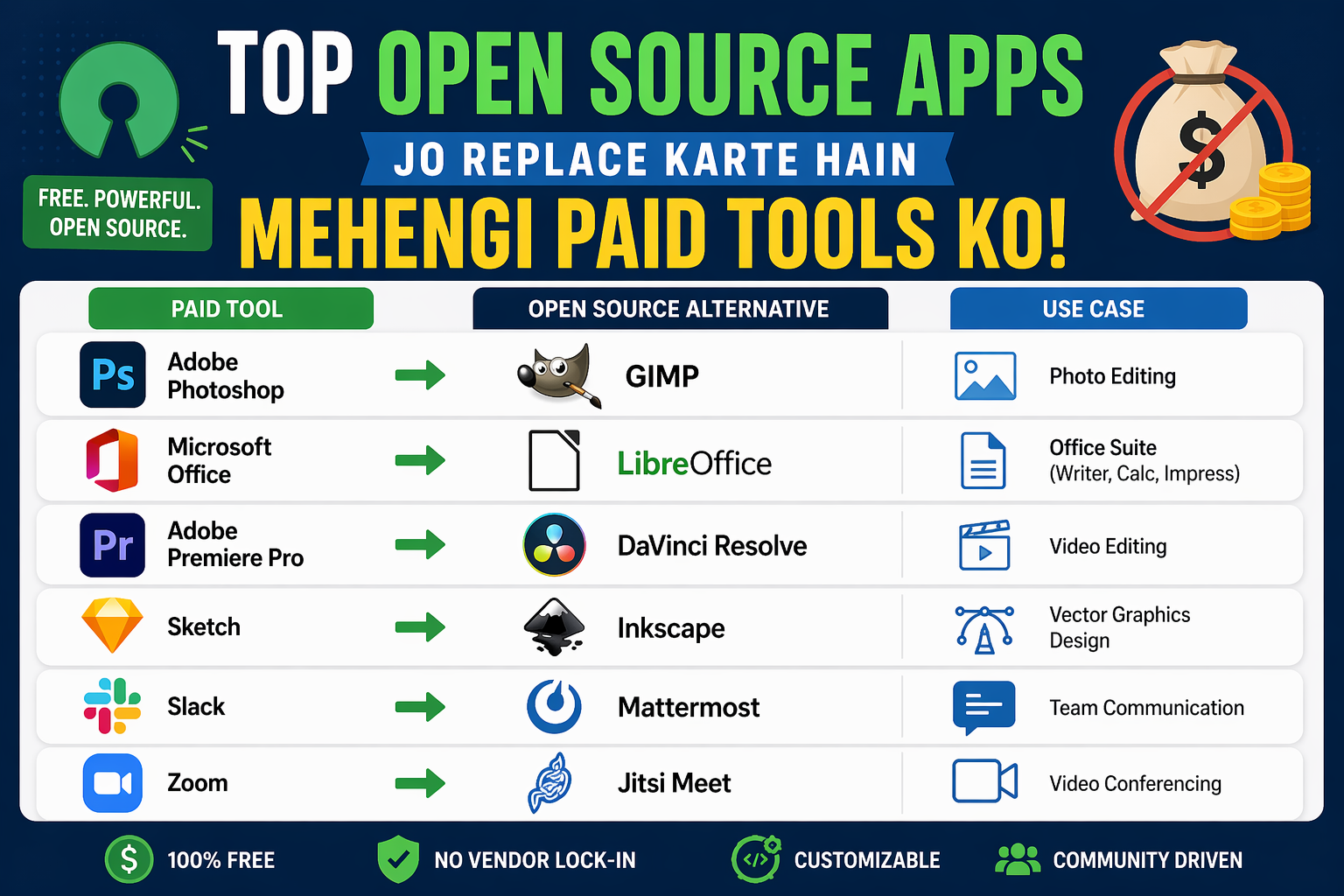
INTRODUCTION:-Kya Aap Abhi Bhi Mehengi Software Ke Liye Paisa Kharch Kar Rahe Hain?
Soch kar dekhiye — ek student hai jo apni assignments ke liye Microsoft Office chahta hai. Ek freelancer hai jo photo editing ke liye Photoshop afford nahi kar sakta. Ek chhota business owner hai jisko video editing tool chahiye lekin budget tight hai.
Yeh sirf kahani nahi hai — yeh India ke karodo logon ki sacchi problem hai.
Lekin aaj hum aapko ek aisi duniya se milwane wale hain jahan yeh sab problems ka ek hi jawaab hai — Free Software Guide 2026. Yeh guide aapko batayegi ki kaise aap duniya ke sabse mehengi paid tools ko unke free open-source alternatives se replace kar sakte hain — bina ek rupaya kharch kiye, bina kisi hidden subscription ke, aur bilkul legally.
2026 mein open-source software itna powerful ho chuka hai ki professionals bhi inhe prefer karne lage hain. Toh chaliye shuru karte hain.
Open Source Software Kya Hota Hai? — Seedha Simple Explanation
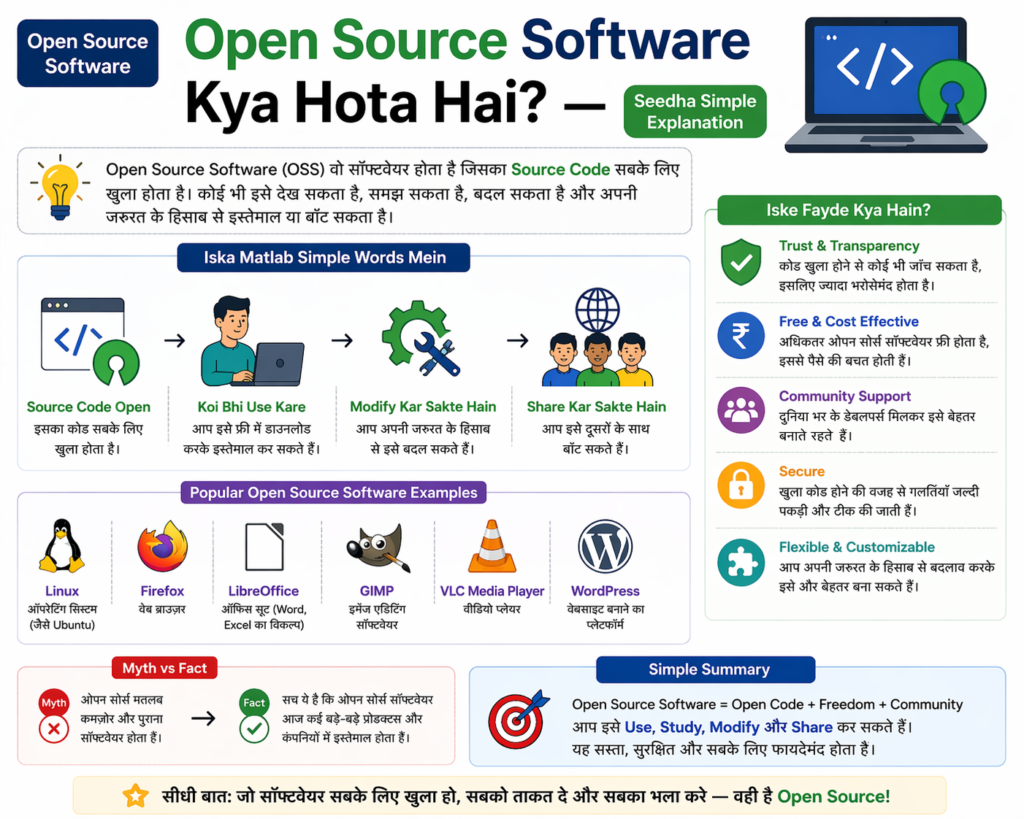
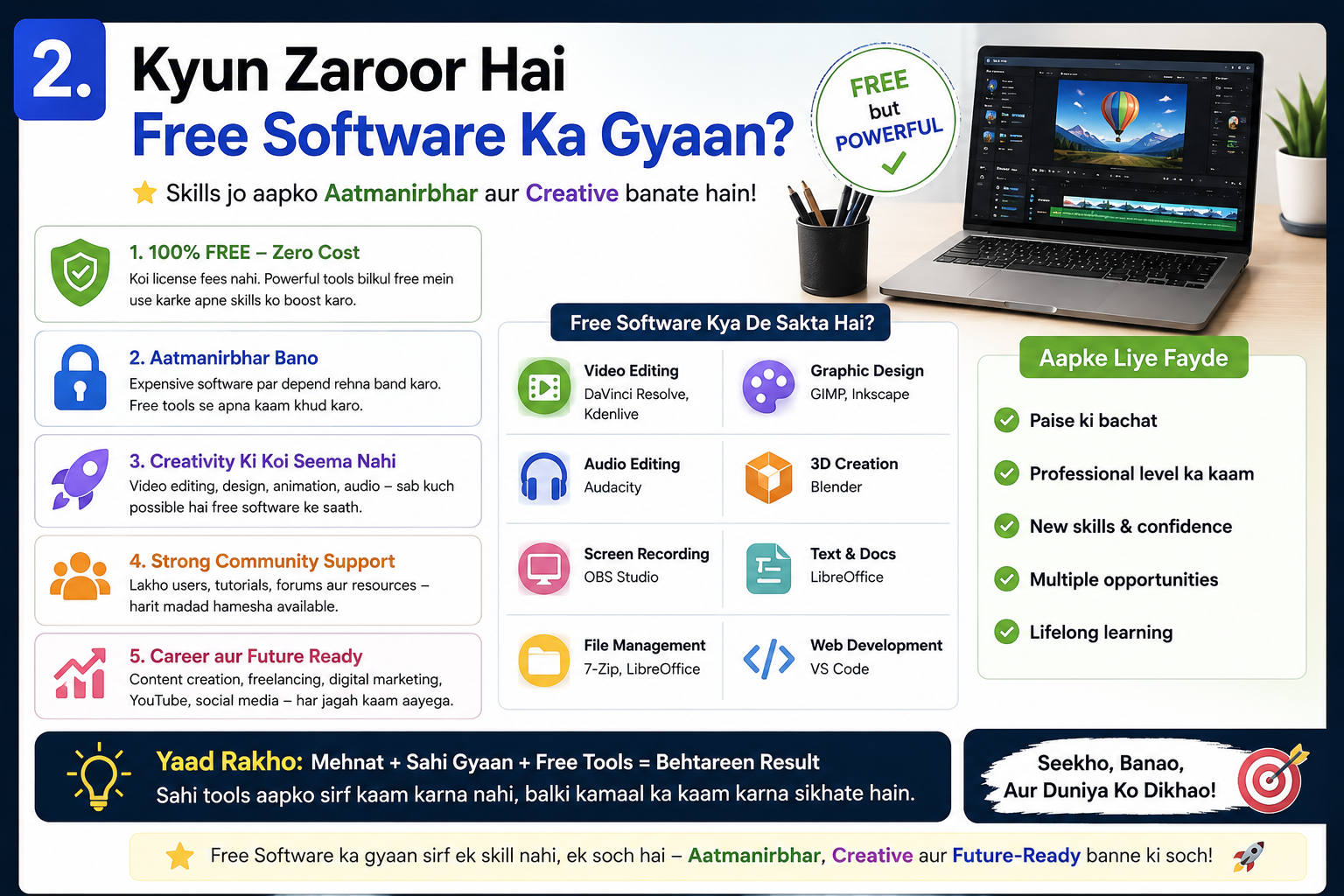
Open source matlab woh software jiska code publicly available hota hai. Koi bhi developer isko dekh sakta hai, improve kar sakta hai, aur distribute kar sakta hai. Yahi wajah hai ki yeh tools:
- Bilkul free hote hain
- Regular updates milte rehte hain
- Community dwara tested hote hain
- Virus aur spyware se safe hote hain
Free Software Guide 2026 ka sabse bada message yahi hai — free matlab weak nahi hota. Kai baar free tools paid tools se zyada reliable aur feature-rich hote hain.
2026 Mein Kyun Badal Rahe Hain Log Paid Se Free Tools Ki Taraf?
Pichhle kuch saalon mein kuch bade changes aaye hain jo logon ko open source ki taraf le ja rahe hain:
Adobe ne prices badhaaye — Creative Cloud subscription 2025 mein phir se mehenga ho gaya, jisse lakho users ne alternatives dhundhe.
Microsoft Office bhi subscription-based ho gaya — Ek baar khareedne ki jagah ab har mahine ya saal paisa dena padta hai.
Privacy concerns badhein — Bahut si paid companies user data collect karti hain. Open source tools zyada transparent hote hain.
Internet speed improved — India mein ab itna achha internet hai ki cloud-based free tools smoothly chal sakte hain.
Yahi wajah hai ki Free Software Guide 2026 aaj ek zaroori resource ban chuki hai — students se lekar professionals tak, sab isko follow kar rahe hain.
Top Open Source Apps Jo Replace Karte Hain Mehengi Paid Tools Ko
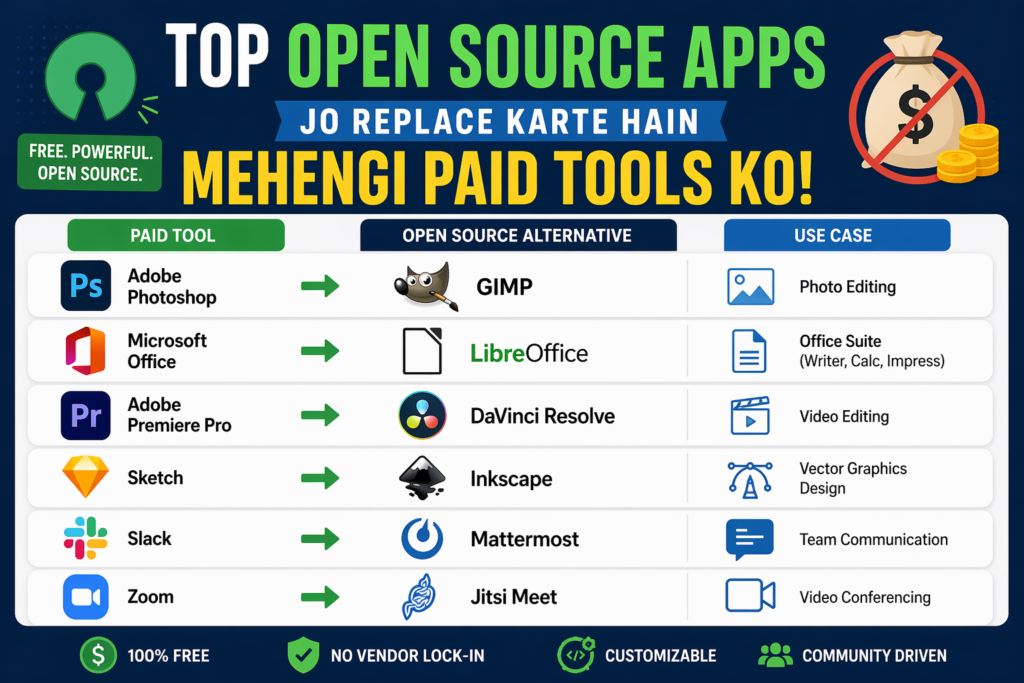
1. LibreOffice — Microsoft Office Ka Zabardast Free Jawab
Replace karta hai: Microsoft Office (Word, Excel, PowerPoint) Cost saved: Rs. 4,000 – Rs. 6,000 per year
LibreOffice 2026 mein aur bhi better ho gaya hai. Naya version faster hai, better compatibility hai MS Office files ke saath, aur interface bhi cleaner hai.
Kya milta hai:
- Writer (Word alternative)
- Calc (Excel alternative)
- Impress (PowerPoint alternative)
- Draw (Visio alternative)
- Base (Access alternative)
Students aur office workers ke liye yeh ek complete package hai. Free Software Guide 2026 mein yeh pehli recommendation isliye hai kyunki almost har koi ise daily use karta hai.
Download: libreoffice.org
2. GIMP 3.0 — Professional Photo Editing Bilkul Free
Replace karta hai: Adobe Photoshop (Rs. 1,675/month) Cost saved: Rs. 20,000+ per year
GIMP ka version 3.0 2025 mein release hua aur yeh game-changer hai. Ab yeh aur bhi Photoshop jaisa feel deta hai, non-destructive editing support karta hai, aur performance bahut improve hui hai.
Key features:
- Layer-based editing
- Advanced filters aur effects
- Script-Fu automation
- RAW photo support DARKTABLE ke saath
- Plugin ecosystem
Graphic designers, bloggers, social media creators — sab ke liye yeh ek must-have tool hai. Ek baar sikho, zindagi bhar free use karo.
Download: gimp.org
3. Inkscape — Adobe Illustrator Ka Free Alternative
Replace karta hai: Adobe Illustrator (Rs. 1,675/month) Cost saved: Rs. 20,000+ per year
Logo design, vector graphics, illustrations — yeh sab Inkscape mein ho sakta hai. Yeh SVG format par based hai aur professional-quality output deta hai.
Best use cases:
- Logo banana
- Posters aur flyers design karna
- Icons aur illustrations
- Infographics
Freelance designers ke liye Free Software Guide 2026 ki yeh recommendation lakhs rupaye bachaa sakti hai. Inkscape ki community bahut active hai aur tutorials easily milte hain.
Download: inkscape.org
4. DaVinci Resolve Free — Hollywood-Level Video Editing
Replace karta hai: Adobe Premiere Pro (Rs. 1,675/month) Cost saved: Rs. 20,000+ per year
Technically DaVinci Resolve fully open source nahi hai, lekin iska free version itna powerful hai ki paid versions ki zaroorat hi nahi padti. Hollywood films bhi isme edit hoti hain.
Jo milta hai free mein:
- Professional timeline editing
- Color grading tools (industry best)
- Audio mixing — Fairlight DAW
- Visual effects — Fusion
- Collaboration tools
YouTubers, filmmakers, wedding videographers — sab ke liye yeh Free Software Guide 2026 ki sabse powerful recommendation hai.
Download: blackmagicdesign.com
5. VLC Media Player — Sabse Reliable Free Media Player
Replace karta hai: Windows Media Player, paid players Cost saved: Rs. 500 – Rs. 2,000
VLC ko koi introduction nahi chahiye. 2026 mein bhi yeh duniya ka #1 free media player hai. Har format chalata hai, fast hai, aur bilkul ad-free hai.
Features jo koi nahi deta:
- Network streaming support
- Subtitle auto-download
- Audio/video filters
- Phone ko remote control bana sakta hai
- Portable version bhi available
Download: videolan.org
6. Audacity — Professional Audio Editing Without Paying
Replace karta hai: Adobe Audition (Rs. 1,675/month) Cost saved: Rs. 20,000+ per year
Podcasters, musicians, YouTubers — sab Audacity use karte hain. 2025 mein Audacity ne apni privacy policy fix ki aur ab yeh fully community-driven project hai.
Kya kar sakte hain:
- Multi-track recording
- Noise reduction
- Pitch correction
- Podcast editing
- Voice-over recording
Ghar se kaam karne wale content creators ke liye yeh Free Software Guide 2026 ki ek golden recommendation hai.
Download: audacityteam.org
7. Kdenlive — Simple Yet Powerful Free Video Editor
Replace karta hai: Final Cut Pro, Vegas Pro Cost saved: Rs. 30,000+ (one-time cost)
Jo log DaVinci Resolve thoda complex lagte hain unke liye Kdenlive ek achha alternative hai. Yeh beginner-friendly hai lekin features mein koi compromise nahi.
Highlights:
- Multi-track timeline
- Transitions aur effects
- Title creator
- Proxy editing for slow computers
- Linux, Windows, Mac support
Download: kdenlive.org
8. Brave Browser — Fastest aur Safest Free Browser
Replace karta hai: Chrome (privacy concerns), paid VPN services Cost saved: Rs. 1,000 – Rs. 3,000/year (VPN cost)
Brave 2026 mein bhi privacy-first browsing ka champion hai. Yeh Chrome se 3x faster hai kyunki ads aur trackers automatically block ho jaate hain.
Kyu unique hai:
- Built-in ad blocker
- Built-in VPN-like shields
- BAT token rewards earn kar sakte hain
- Tor integration for private windows
- Less battery usage on laptops
Aaj ke time mein online privacy ek badi zaroorat hai. Free Software Guide 2026 mein Brave browser ko include karna isliye zaroori tha.
Download: brave.com
9. Thunderbird — Email Management Ka Free Powerhouse
Replace karta hai: Microsoft Outlook (Rs. 500+/month) Cost saved: Rs. 6,000+ per year
Mozilla Thunderbird 2026 version mein completely redesigned ho gaya hai — naya modern interface, better calendar integration, aur improved spam filter.
Features:
- Multiple email accounts ek jagah
- Built-in calendar aur task manager
- End-to-end encryption support
- RSS feeds reader
- Powerful search
Business professionals aur freelancers ke liye yeh ek solid free alternative hai.
Download: thunderbird.net
10. Blender — 3D Animation aur Design Ka Raja
Replace karta hai: Autodesk Maya (Rs. 1,50,000+/year), Cinema 4D Cost saved: Rs. 1,00,000 – Rs. 2,00,000 per year
Blender 2026 mein AI-assisted tools ke saath aur bhi powerful ho gaya hai. Yeh Free Software Guide 2026 ki sabse impressive recommendation hai kyunki iska paid alternative lakhs mein aata hai.
Kya kar sakte hain:
- 3D modeling
- Animation aur rigging
- Visual effects aur compositing
- Video editing bhi
- Game asset creation
Film students, game developers, aur 3D artists ke liye Blender ek career-changing tool hai — aur yeh bilkul free hai.
Download: blender.org
Kaise Safely Download Karein Yeh Tools? — Step by Step Guide
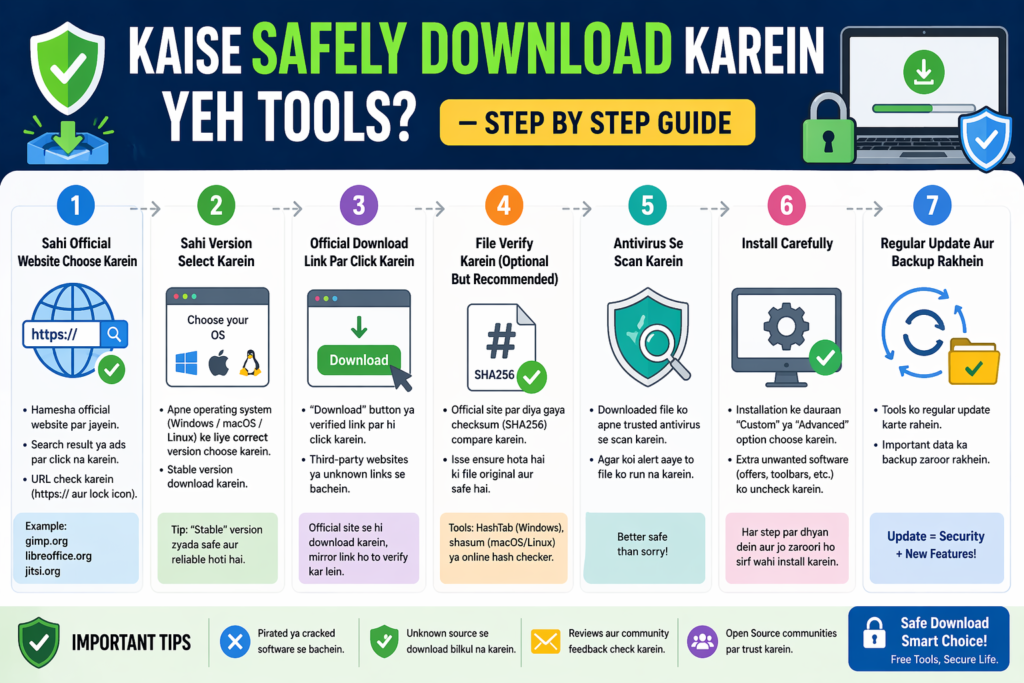
Free Software Guide 2026 ka ek important hissa yeh bhi hai ki hum aapko safe download process bataayein.
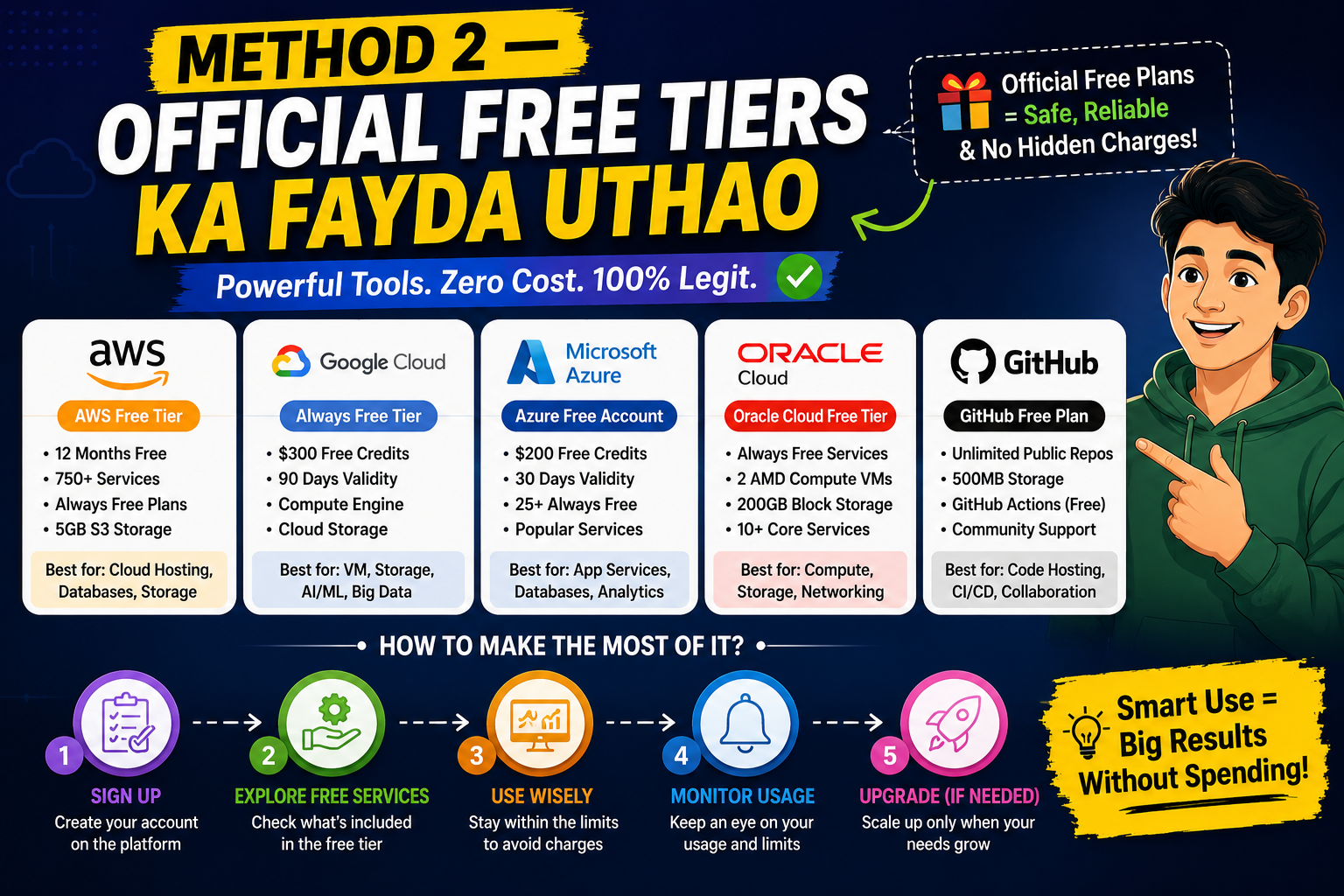
Step 1 — Hamesha Official Website Use Karein Oopar diye gaye har tool ka official website link diya gaya hai. Wahi se download karein. Google par search karte waqt ads par click mat karein — organic results mein jaayein.
Step 2 — VirusTotal Se Scan Karein Download karne ke baad file ko virustotal.com par upload karein. Yeh free service 70+ antivirus engines se file check karti hai.
Step 3 — Installer Ko Dhyan Se Padhein “Custom Install” choose karein na ki “Express Install”. Isse aap extra unwanted software ko uncheck kar sakte hain jo kabhi kabhi bundle hota hai.
Step 4 — Regular Updates Lagaate Rahein Free software bhi regular security updates release karta hai. Inhe ignore mat karein — updates nahi lagane se security holes open rehte hain.
Step 5 — Backup Pehle, Install Baad Mein Naya software install karne se pehle apne important documents aur files ka backup zaroor le lo.
Open Source Vs Paid Software — Sachchi Tulna
| Feature | Open Source (Free) | Paid Software |
|---|---|---|
| Cost | Rs. 0 | Rs. 500 – Rs. 2,00,000/year |
| Privacy | High | Medium-Low |
| Updates | Community-driven | Company-driven |
| Customization | Full | Limited |
| Support | Community forums | Official support |
| Virus risk | Low (if from official site) | Low |
Yeh table dekhne ke baad Free Software Guide 2026 ka message clear ho jaata hai — zyada price matlab zyada better nahi hota.
Students Ke Liye Special Advice
Agar aap student hain, toh yeh Free Software Guide 2026 aapke liye especially valuable hai:
- Engineering students — Blender for 3D design, GIMP for presentations
- Commerce students — LibreOffice Calc for spreadsheets, accounting
- Arts students — Inkscape for design, Audacity for music
- Media students — DaVinci Resolve for video, Audacity for audio
- Computer science students — All of the above plus VSCodium (VS Code open source version)
Ek student agar in sab tools ka poora fayda uthaye, toh woh har saal Rs. 50,000 – Rs. 80,000 tak bachaa sakta hai. Yeh paisa studies par invest ho sakta hai.
Frequently Asked Questions
Q: Kya yeh sab tools 2026 mein bhi update ho rahe hain? Haan! Is article mein mention kiye gaye sab tools actively maintained hain aur regular updates release ho rahe hain.
Q: Kya in tools ko use karna mushkil hai? Nahi. Har tool ke liye YouTube par hazaron Hindi tutorials available hain. GIMP, LibreOffice, aur Audacity ke liye especially beginners ke liye content bahut zyada hai.
Q: Kya mobile par bhi yeh tools available hain? Kuch tools jaise VLC, Brave browser Android/iOS par available hain. LibreOffice ka Android version bhi hai. Lekin zyada tools desktop ke liye hain.
Q: Kya commercial use ke liye bhi yeh free hain? Zyada tar tools commercial use ke liye bhi free hain. LibreOffice, GIMP, Inkscape, Audacity — sab GPL ya similar open license par hain jo commercial use allow karte hain. DaVinci Resolve free version mein commercial use allowed hai lekin redistribution nahi.
Q: Internet ke bina kaam karte hain? Haan! In mein se zyada tar tools offline kaam karte hain. Internet sirf download ke waqt chahiye.
Conclusion — 2026 Mein Free Ka Matlab Weak Nahi Hota
Aaj hum ne dekha ki Free Software Guide 2026 kitni powerful recommendation list hai. LibreOffice se lekar Blender tak — har ek tool apne paid alternative se kisi bhi tarah kam nahi hai.
Agar aap abhi bhi mehengi software subscriptions pay kar rahe hain, toh yeh article ek baar phir se padhein aur calculate karein ki aap kitna paisa bachaa sakte hain. Ek average Indian professional in tools ko use karke har saal Rs. 50,000 se Rs. 2,00,000 tak bachaa sakta hai.
Free Software Guide 2026 ka final message yahi hai — smart choices karo, paise bachao, aur apni skills par invest karo. Kyunki technology aapki madad ke liye hai, aapki jeb khali karne ke liye nahi.
Yeh article apne doston, family members, aur colleagues ke saath share karein — especially unke saath jo abhi bhi paid tools par depend hain. Kyunki yeh knowledge har kisi ke kaam ki hai.